
A practical policy set, the design logic behind it, and three things that changed this year
Most Conditional Access content you find online is a list of toggles. Turn this on, set that to require MFA, here is where the setting lives. That is the easy part. The skill is knowing which policies belong in a baseline, what order you enforce them in, and which mistakes lock you out of your own tenant. A 2026 baseline is also not a 2024 baseline, because a few things changed underneath it this year.
Conditional Access is a design task, not a configuration task
The fastest way to understand Conditional Access is to lock yourself out with it. One broad policy flipped to On without exclusions or a staging pass, and every account in the tenant is gated behind a control nobody can satisfy yet, admins included. The first principle of a baseline is anti-lockout design. Feature coverage comes after. If your design conversation starts with “which controls do we want” instead of “how do we avoid locking ourselves out while we get there,” the order is already wrong.
Break-glass first, everything else second
Before a single policy goes live, you need two cloud-only emergency access accounts on the .onmicrosoft.com domain. Not tied to any individual. Global Administrator assigned permanently, not PIM-eligible, because PIM activation can itself depend on the controls you are about to enforce. Both accounts go into a dedicated security group, and that group is excluded from every Conditional Access policy you build.
There is a catch that surprises people who set this up expecting CA exclusions to be the whole story. Microsoft’s mandatory MFA enforcement applies to break-glass accounts regardless of your CA exclusions, because it fires at the client application level when the account hits the Azure portal, Entra admin center, or Intune admin center. It is not evaluated through Conditional Access at all, so excluding the account from CA does nothing to it. A long password alone no longer gets these accounts in. You need FIDO2 or certificate-based authentication registered on them. This has been the case since the enforcement rolled out, and it is the part of break-glass design most likely to be stale in an older runbook.
Monitoring closes the loop: alert if either account ever signs in. A break-glass sign-in is either a real emergency or an incident. Both are worth a page.
The baseline policy set
Here is the set I run, CA002 through CA012. The numbering leaves CA001 open deliberately, and the names lead with persona and control so the list reads top to bottom without needing a legend.
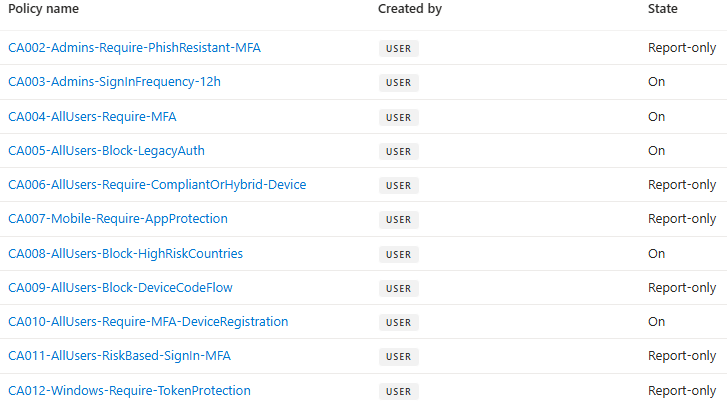
Figure 1. Microsoft Entra Conditional Access policy list showing the CA002 through CA012 baseline with each policy’s state, mix of On and Report-only.
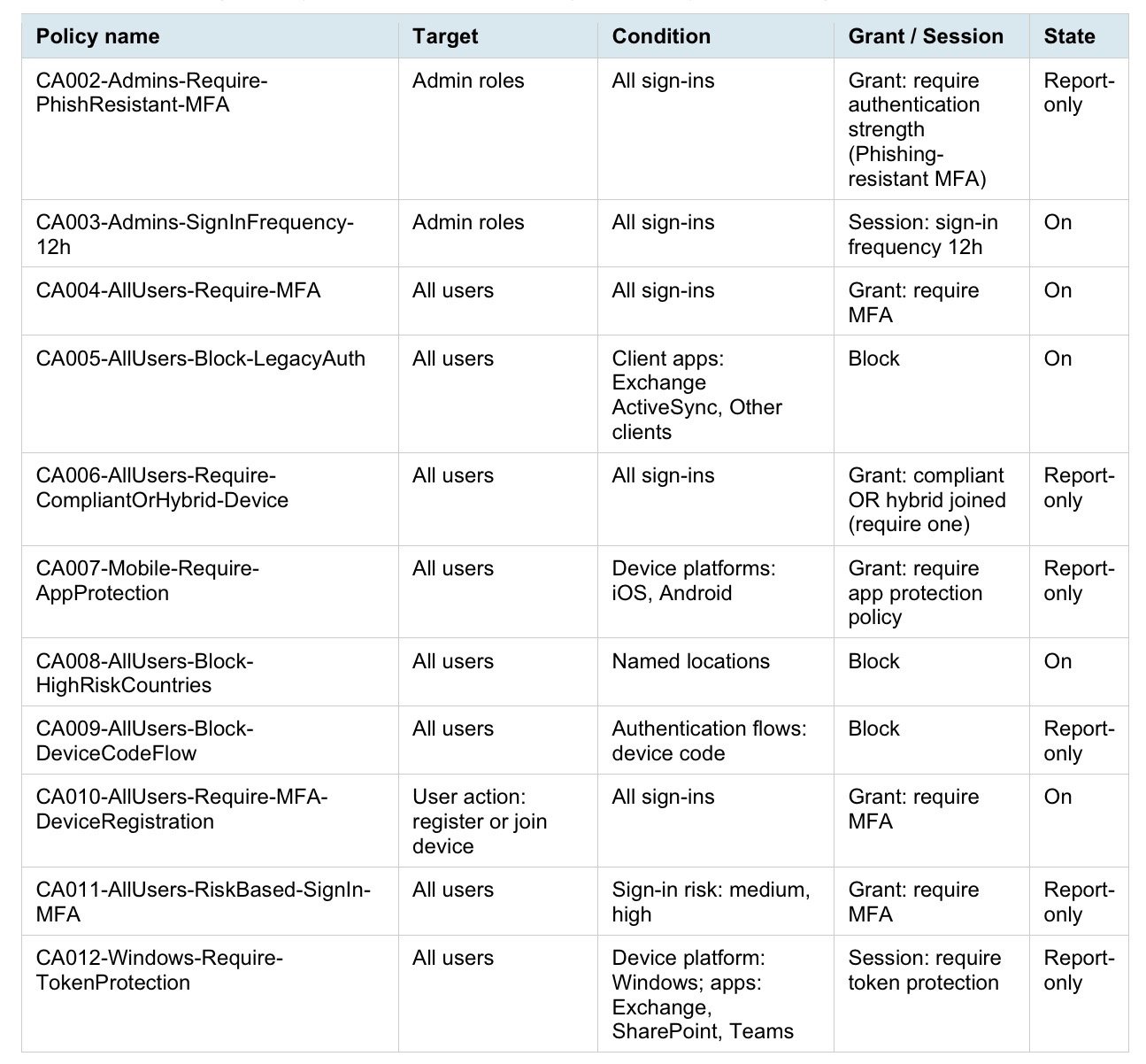
Table of the eleven-policy Conditional Access baseline, CA002 through CA012, showing each policy’s target, condition, grant or session control, and starting state.
A few of these carry design decisions that are not obvious from the row.
CA002 uses Require authentication strength set to Phishing-resistant MFA. For privileged roles, that is the standard I chose for this baseline rather than regular MFA. It is a design recommendation, not a claim that Microsoft requires every organization to configure it this way. The built-in strength can be satisfied by Windows Hello for Business or a platform credential, a FIDO2 security key, or Microsoft Entra certificate-based authentication configured for multifactor authentication. Do not also select Require multifactor authentication in the same policy. The portal blocks that combination because the authentication strength already defines which MFA methods are acceptable.
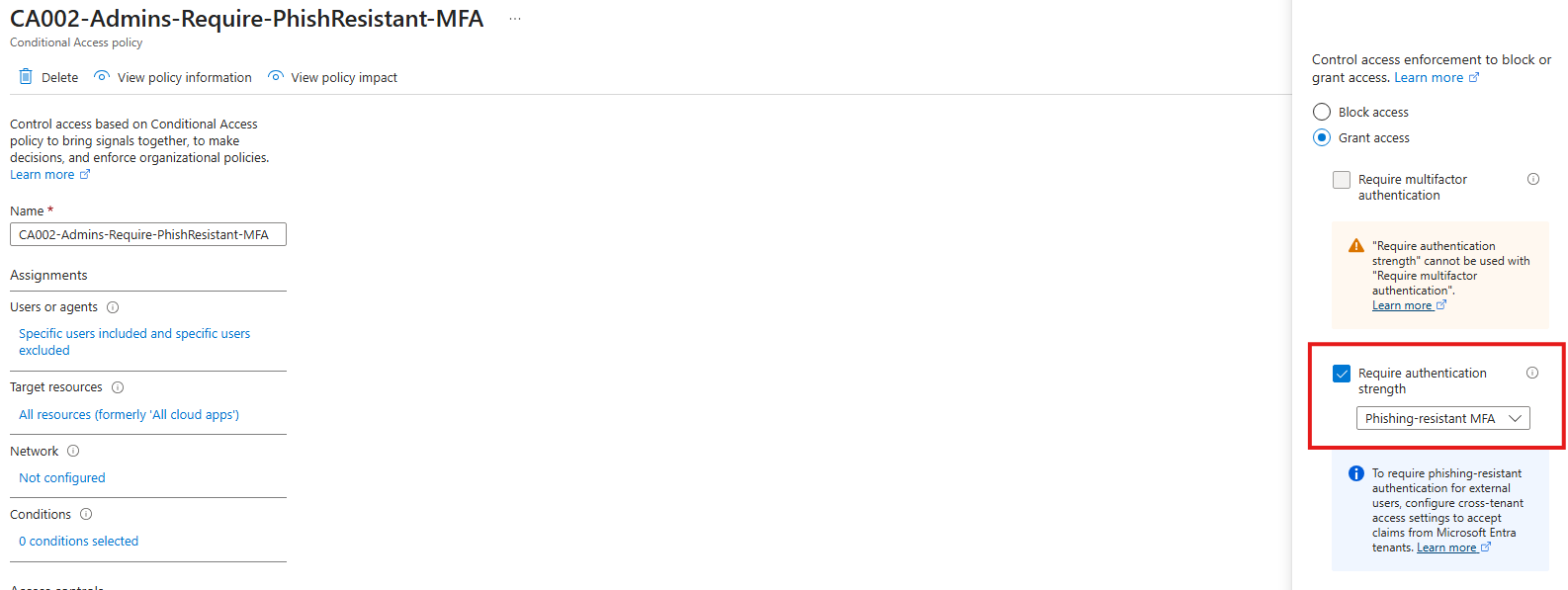
Figure 2. CA002 grant controls showing Phishing-resistant MFA selected and the authentication-strength constraint.
This one starts in Report-only and stays there until the hardware is actually in your admins’ hands. Enforcing phishing-resistant MFA before the FIDO2 keys arrive is a self-inflicted lockout of exactly the accounts you most need.
CA003 is a separate policy from CA002 on purpose. Sign-in frequency and MFA enforcement are two different concerns, and binding them into one policy makes both harder to reason about and to change later. Two concerns, two policies.
CA004 is the broadest policy in the set, all users and MFA. The break-glass exclusion here is non-negotiable. If you only remember to exclude break-glass from one policy, it is this one.
CA005 targets only Exchange ActiveSync and Other clients in the client apps condition. Leave the browser and modern auth client checkboxes unselected. Tick all of them and you have written a policy that blocks everything, including the modern clients you intend to allow.
CA006 requires compliant or hybrid joined, one of the two, not both. Report-only first, and this is one where the report-only logs earn their keep. Before you enforce, read the logs for unmanaged and home devices, including your own admin workstation if it is not enrolled. The policy will happily block the machine you administer from, which is a memorable way to learn the lesson.
CA007 uses Require app protection policy for iOS/iPadOS and Android. On June 30, 2026, the Require approved client app control and policies containing it became read-only. Administrators can no longer create new policies or edit existing policies that use the control, although they can disable or delete them. Existing policies continue to enforce for users as long as they remain enabled. Organizations should still migrate to Require app protection policy so their policies remain maintainable and aligned with Microsoft’s current application-protection model. A corresponding Intune App Protection Policy must be assigned, and every targeted client application must support the control.
CA008 is named by control, “Block-HighRiskCountries,” not by the country list itself. The list will change. The policy name should not have to.
CA009 blocks the device code authentication flow through the Authentication flows condition, which is relatively new as conditions go. Microsoft’s own guidance is to get as close as possible to a tenant-wide block, allowing device code flow only in documented cases like legacy tooling that cannot be updated. Report-only first so you can see what legitimately uses it in your tenant before you cut it off.
CA010 targets a user action, register or join a device, not a resource. It pairs with a setting in Entra device settings, where Require Multifactor Authentication to register or join devices should be set to No. CA010 enforces the MFA requirement; the legacy toggle does the same thing through an older mechanism, and leaving both on creates a conflict. Microsoft’s own UI banner now points you to Conditional Access over the legacy toggle. One caveat if you run external authentication methods: those are currently incompatible with authentication strength, so this policy uses the Require multifactor authentication grant rather than an authentication-strength grant.
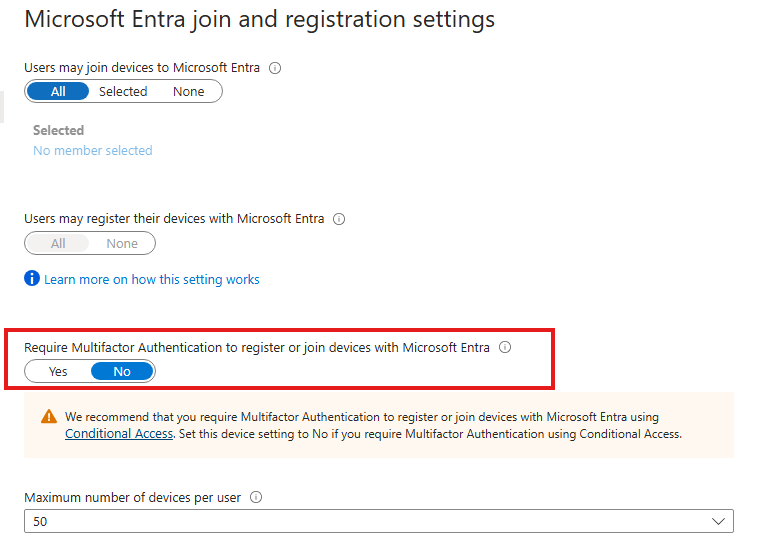
Figure 3. Entra device settings showing the MFA registration toggle set to No with Microsoft's recommendation to use Conditional Access.
CA011 uses sign-in risk to require MFA for medium- and high-risk sign-ins, and it requires Entra ID P2 or Microsoft Entra Suite. Start it in Report-only and watch the results until you have seen enough normal activity—travel, remote work, the applications people use, and their usual locations. A fixed two- or four-week window does not mean much if the data is not representative. Before enforcing the policy, investigate any existing risk detections and make sure targeted users are already registered for MFA, because they cannot register during a risky sign-in. Pilot it with a small group first and make sure the service desk knows how to handle a legitimate user who gets blocked. If the tenant only has Entra ID P1, this policy is not available.
CA012 is Token Protection. The policy in this baseline targets Windows native and desktop clients. The screenshots and sign-in observations in this article come from my earlier Windows-only lab validation; I did not retest the Apple or limited browser scenarios after Microsoft expanded the documented support matrix. Microsoft currently lists Exchange Online, SharePoint Online, and Microsoft Teams as supported native resources; Windows enforcement also supports Azure Virtual Desktop and Windows 365. Microsoft’s current platform availability table lists native-application support as generally available on Windows, iOS/iPadOS, and macOS. Browser support is separate and limited: it is currently in preview for selected web applications accessing Azure Resource Manager on supported Windows and macOS configurations, not for general Microsoft 365 browser sessions. The Windows policy requires Microsoft Entra ID P1 and a supported Windows 10 or later device that is Entra joined, hybrid joined, or registered. It does not protect general browser-cookie theft, so Token Protection remains one layer in a defense-in-depth strategy rather than a complete answer to token theft.
Three things that changed in 2026
On June 30, 2026, the Require approved client app control and policies containing it became read-only. Administrators can no longer create new policies or edit existing policies that use the control, although they can disable or delete them. Existing policies continue to enforce for users as long as they remain enabled. Organizations should migrate to Require app protection policy after validating application compatibility and assigning the corresponding Intune App Protection Policies.
The resource-exclusion enforcement change has a longer runway than most people realize. Microsoft began automatically applying the improved enforcement model on June 15, 2026, with the rollout progressing over several weeks. The gap it closes works like this. Until now, a sign-in through a client application that requests only OIDC scopes, like openid, profile, or email, or a limited set of directory scopes like User.Read, was not subject to a Conditional Access policy targeting All resources if that policy had any resource exclusions. The policy was skipped entirely for those sign-ins. After the change, those policies enforce even when resource exclusions are present, so a flow that used to pass straight through now has to satisfy MFA, device compliance, or whatever else the policy requires.
This only matters if you have an All-resources policy with one or more resource exclusions. If none of your policies are configured that way, the change does not affect you, and Microsoft will tell you which case you are in through a Message Center notification if your tenant is impacted.
You also have a control here, which is the part worth knowing as the person designing the baseline. The behavior is governed by a Baseline scopes setting in Entra. You can enforce the new model immediately, disable enforcement to revert while you remediate, or customize it by assigning a tenant-owned application as the target resource for baseline scopes and excluding that application from your All-resources policies instead. The practical reason this matters: tools like the Azure CLI authenticate with exactly the low-privilege scopes this change targets, so if you have a fragile custom app or an automation flow that cannot handle a Conditional Access challenge, the Baseline scopes setting is your lever to stage the change rather than have it land on you unannounced.
Mandatory MFA enforcement is still catching people out. This one did not start in 2026, but it keeps surfacing in baseline reviews, so it belongs here. Microsoft’s tenant-level MFA enforcement for the admin portals applies even to break-glass accounts, and it runs at the client application level rather than through Conditional Access. CA exclusions still matter for everything you build, but they do not exempt an account from this. FIDO2 or certificate-based authentication is required. If your runbook still assumes a long password gets a break-glass account into the Azure portal, it is out of date.
Staging enforcement without breaking sign-ins
Report-only is not a draft state. It is an active evaluation state. Every policy in Report-only is being evaluated against real sign-ins right now, and the result is recorded without being applied. That is the whole point of it.
Two tools tell you what a policy would do before it does it. The What If tool lets you model a hypothetical sign-in and see which policies would apply. The Conditional Access tab in the sign-in logs shows you what each policy actually evaluated to against real sign-ins that already happened, Report-only results included. Read those before you enforce anything broad.
The sequence stays the same, but the timing does not. Start in Report-only and review enough sign-ins to cover the users, applications, devices, locations, and working patterns the policy will affect. Then move to a controlled pilot with clear success and rollback criteria. Expand the policy in stages after the pilot results meet those criteria. A broad policy should not move directly from Report-only to tenant-wide enforcement just because two weeks have passed.
The naming convention
The names in the table follow a pattern: a CA### prefix, the group the policy applies to, and the control it enforces. Microsoft recommends using a consistent naming standard but does not prescribe one format. I use this pattern because it makes the policy list easier to scan and gives administrators a short reference when troubleshooting. Naming alone does not prevent a tenant from reaching the 240-policy limit. That requires regular reviews to remove obsolete policies, find overlaps, and consolidate policies that apply the same controls to the same users and resources.
A baseline is not a fixed artifact you build once. It is a set of decisions you can defend, staged in an order that does not lock you out, named so the next person can read it. The toggles are the last ten percent. Questions about which path fits your environment are welcome. Feel free to reach out.
