
A Conditional Access policy gets pushed with the wrong scope, or federation goes down, or a PIM dependency breaks at the worst possible time. When that happens, the break-glass account is the last key to the building. Its value is exactly proportional to how well it was designed and how rarely it gets used. This article covers how to build one that actually works, what mandatory MFA enforcement changed for these accounts specifically, and how to run a governance process that does not just sit in a drawer.
Two common failure modes
Most environments land in one of two states. Either there are no break-glass accounts at all, or there are accounts that exist on paper but are not fit for purpose.
The second case is the dangerous one because it looks solved. The account is PIM-eligible instead of permanently active, so it cannot activate its role when PIM is the thing that broke. Or it uses Authenticator push, which depends on a phone and a network that may be exactly what is down. Or it was not excluded from a Conditional Access policy that blocks or restricts sign-in, so a bad policy takes it out along with everyone else. Or nobody monitors it, so a sign-in by that account would go unnoticed.
Recognize your own tenant in either of those, and the rest of this article is the fix.
Design principles
These are the decisions that make a break-glass account dependable. Each one prevents a specific way the account fails when you need it.
| Principle | Why it matters | The mistake it prevents |
|---|---|---|
Cloud-only account using the tenant's
.onmicrosoft.com domain
|
The account must not be synchronized from on-premises or depend on a federated identity provider. | A federation or on-premises identity outage locks out the account intended to recover from that outage. |
| Permanent active Global Administrator role, not PIM-eligible | The role must be available without activation, approval, or another administrator. | If PIM or its approval process is unavailable, an eligible account cannot activate its role. |
| Phishing-resistant authentication using a passkey (FIDO2), preferably a physical security key, or certificate-based authentication | The account can satisfy mandatory MFA without depending on SMS, voice, push notifications, or a personal phone. | Phone loss, mobile-service failure, SIM swapping, or push-service disruption makes the recovery account unusable. |
| Credentials and authentication devices do not expire and are not subject to inactivity cleanup | Emergency credentials may go unused for long periods but must remain valid. | An expiration policy or automated cleanup silently removes the credential before an emergency. |
| Excluded from Conditional Access policies that block or restrict sign-in, using a dedicated group | A misconfigured policy must not remove the tenant's recovery path. Report-only policies do not require an exclusion. | A blanket Conditional Access block prevents the emergency account from signing in to correct the policy. |
| Not associated with an individual administrator or an employee-supplied device | The account and its credentials must remain available to authorized responders rather than one person. | The recovery path becomes dependent on an administrator's personal phone, device, employment status, or availability. |
| Excluded from authentication-method registration campaigns after the approved emergency credentials are configured | Later sign-ins should not prompt someone to add an unapproved method to the shared emergency account. | A registration prompt leads an administrator to attach the account to a personal phone, device, or passkey provider. |
| A separately stored backup credential, such as a second FIDO2 security key | The account still has a recovery path if its primary credential is lost, damaged, or unreachable. | A single missing or failed security key makes an otherwise functional account unusable. |
| At least two emergency access accounts, with credentials stored in separate secure locations | No single account, person, safe, building, or credential store holds the complete recovery capability. | One compromised account or inaccessible location removes every emergency access option. |
| Use restricted to a designated secure workstation or Privileged Access Workstation | Highly privileged emergency credentials should be used only from a controlled and trusted device. | A compromised everyday workstation captures the emergency credentials during recovery. |
| Clear and consistent naming convention | The accounts are immediately recognizable in sign-in and audit logs. | Generic names make legitimate or unauthorized emergency-account use difficult to identify during an incident. |
Microsoft recommends passkey (FIDO2) for emergency access accounts, or certificate-based authentication when the organization already has PKI. The credential should not be tied to an individual administrator or an employee-supplied phone. In this design, I use physical FIDO2 security keys stored securely so authorized responders can access them during an emergency.
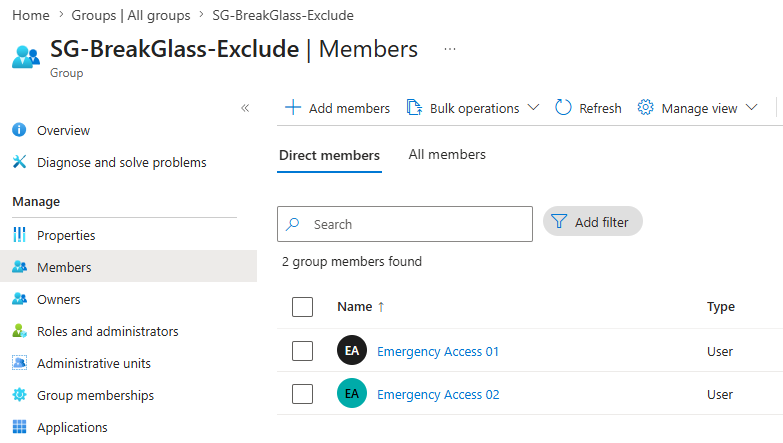
Figure 1. The SG-BreakGlass-Exclude group with both Emergency Access accounts as members.
What mandatory MFA enforcement means for break-glass accounts
This is the part of the design that changed, and it is the one most people have not fully worked through.
Microsoft’s mandatory MFA enforcement is now in effect. Phase 1 began rolling out in October 2024 for the Azure portal, Microsoft Entra admin center, and Microsoft Intune admin center. Enforcement for the Microsoft 365 admin center began in February 2025. Phase 2 began October 1, 2025 and covers Azure CLI, Azure PowerShell, the Azure mobile app, infrastructure-as-code tools, Azure SDKs, and Azure Resource Manager REST API endpoints. Create, update, and delete operations require MFA, while read-only operations do not. Microsoft allowed tenants to postpone Phase 2 only until July 1, 2026.
Break-glass accounts are in scope. There is no exception. The Microsoft Learn page states it directly: the system enforcement applies to all user accounts, regardless if they are a break-glass account. (source: learn.microsoft.com/en-us/entra/identity/authentication/concept-mandatory-multifactor-authentication)
The part that’s easy to overlook is that a Conditional Access exclusion does not exempt a break-glass account from Microsoft’s mandatory MFA requirement. This is system enforcement outside your tenant’s Conditional Access policies. Phase 2 is enforced by Azure Resource Manager for management requests, so excluding the account from every Conditional Access policy still does not remove the MFA requirement.
The practical consequence is simple: a password-only break-glass account is no longer a reliable recovery path. Once mandatory MFA is enforced, the account must satisfy MFA before it can use the affected admin portals or perform protected Azure management operations. Microsoft may prompt the user to register an MFA method, but an emergency is the wrong time to depend on that enrollment process. Register a passkey (FIDO2), preferably a physical security key, or configure certificate-based authentication in advance, and then test the account. If your break-glass accounts still depend on password-only access, fix that before treating them as usable.
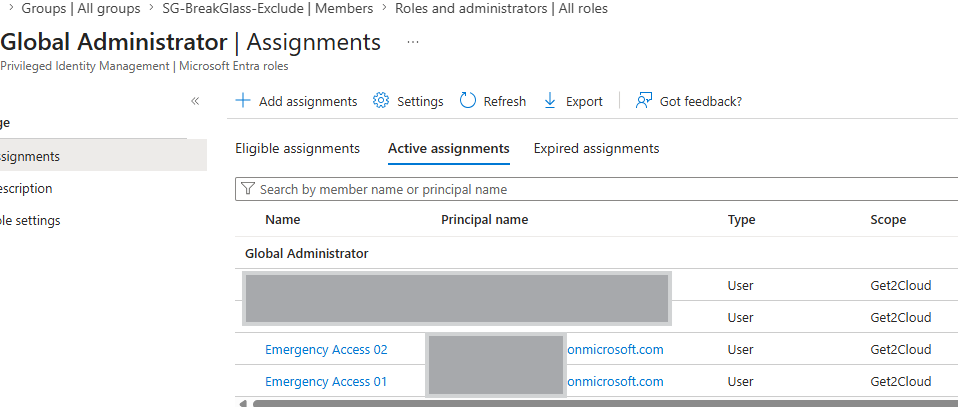
Figure 2. Both Emergency Access accounts hold Global Administrator as a permanent active assignment, shown under Active assignments in PIM rather than Eligible.
In my lab, the exclusion group sits across all 11 Conditional Access policies, CA002 through CA012, with both Emergency Access accounts as members.
The reason that matters showed up while building the baseline.
One policy, CA005, started with zero client-apps conditions. With nothing scoped under client apps, it evaluated as a blanket all-traffic block. If that policy had carried no break-glass exclusion, the accounts I was using to troubleshoot would have been caught in the same block I was trying to fix. The exclusion group is what kept the recovery path open while the policy that caused the problem was still live. That is the difference between an exclusion group as good hygiene and an exclusion group as the thing that saves the tenant.
Governance is ongoing, not a one-time build
A break-glass account is not a configuration artifact you set once. It is a live operational control, and it decays. The FIDO2 key gets misplaced, role assignments drift, a sign-in goes unreviewed. Four activities keep it real, each on a cadence.
Sign-in and audit log monitoring. Alert on any sign-in by either account and retain the related audit activity for review. Outside a planned test or an actual emergency, there should be no activity. Test the alert during the quarterly account check and investigate any unexpected use immediately.
Credential verification. Confirm the FIDO2 keys still work and that each account can sign in and perform an agreed administrative task. Test this at least every 90 days and document the result. A key that fails during an incident is the same as no key.
Access review. Confirm that both accounts still hold permanent active Global Administrator assignments, that no unnecessary roles have been added, and that the list of people authorized to use the credentials is current. Review this at least every 90 days and after staffing changes.
Physical credential audit. Confirm that each FIDO2 key is in its documented secure location and accessible to the authorized responders who might need it. Check this at least every 90 days and whenever the authorized-user list or storage arrangement changes.
What these accounts are not
A break-glass account is not a shared admin login for routine work, and it is not a convenient fallback for everyday role elevation. Either of those turns the account into a liability instead of a safeguard. Any use outside a documented test or genuine emergency should trigger immediate investigation, and every emergency use should be followed by a review of the actions taken.
Questions about which path fits your environment are welcome. Please feel free to reach out.
