
A grounded IT knowledge agent on Copilot Studio and SharePoint, delivered in Teams, with the refusal path engineered on purpose.
An IT service desk generates the same questions over and over. How do I set up MFA for a new user. Walk me through offboarding. How do I build that Conditional Access policy. The answers already exist, sitting in SharePoint runbooks nobody finds fast enough, so a service desk technician reaches out to a senior engineer instead, and the senior engineer becomes a human search index.
I built an agent to close that gap. It answers from a curated SharePoint runbook library, cites the source document on every answer, and refuses when the answer is not in the runbooks. No general knowledge. No web. If it is not in a runbook, the agent says so and points the technician to a senior.
What the system does
A service desk technician opens Ask Runbook in their Teams sidebar and types a question in plain language. The agent retrieves from a single SharePoint document library, composes an answer strictly from what it retrieved, and returns it with a clickable citation back to the source .docx. Procedures come back as numbered steps. A citation link opens the exact runbook in a new tab.
The agent does two things and refuses a third. It retrieves and grounds an answer when the runbooks cover the topic. It declines cleanly when they do not. Web search and Allow ungrounded responses are switched off. These settings do not guarantee that every generated sentence comes from the runbooks.
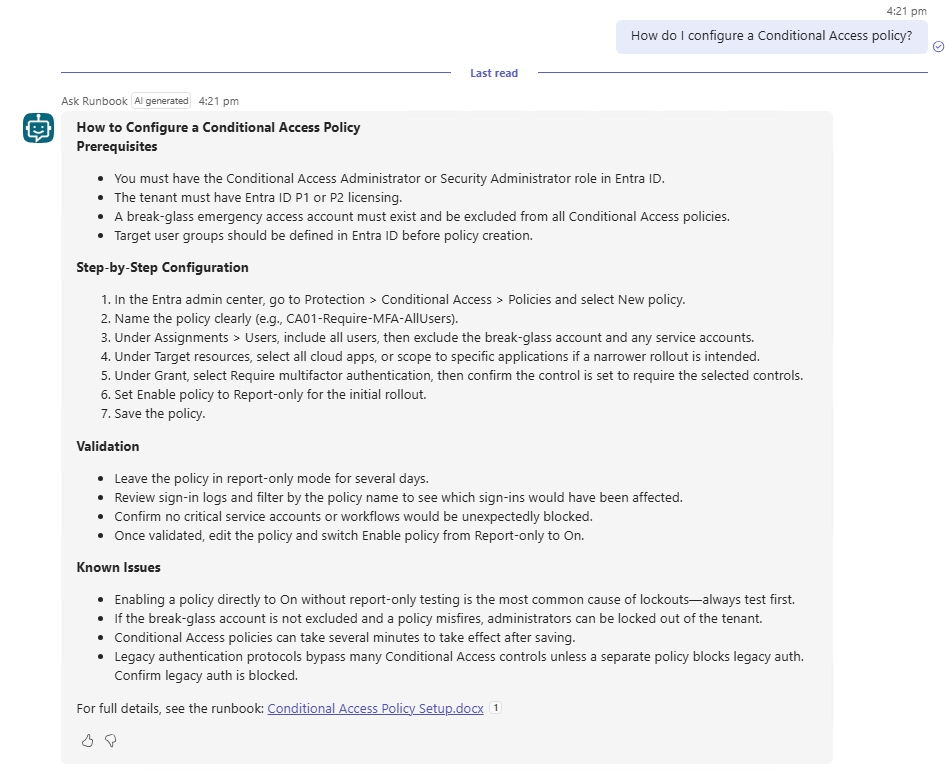
Figure 1. Ask Runbook in Teams: a plain-language question returns structured steps with a citation link to the source runbook.
The citation is only as good as where it lands. Clicking it opens the actual source runbook, which is the step that turns a plausible-looking answer into a verifiable one.
Architecture
Every component is native to Microsoft 365 or already licensed in the tenant. There is no separately-provisioned vector database, no external LLM API of my own, no third-party identity provider, and no separate monitoring stack.
The agent runs on Microsoft Copilot Studio with generative orchestration, which means the model decides which knowledge source applies rather than a hand-authored dialog tree. The model is Claude Sonnet 4.6, selected in the Copilot Studio model picker. It is a GA model, which is the point: OpenAI GPT models remain the default for new agents, and preview models can shift behavior under you, so for a build meant to stay stable I chose the GA Anthropic option over a preview. The model choice also carries a data-residency dimension that is easy to miss, covered in its own section below.
Retrieval runs through Work IQ, Microsoft's tenant graph grounding with semantic search over the Microsoft Graph. That layer requires generative orchestration, requires the agent's authentication set to Authenticate with Microsoft, and requires at least one Microsoft 365 Copilot license assigned in the tenant with a semantic index configured. Retrieval respects the signed-in user's SharePoint permissions through delegated authentication, so the agent only ever surfaces content the user could already open.
The knowledge source is one SharePoint document library of Word .docx runbooks. Citations render as clickable links to the source file with no extra work. Delivery is a Teams personal app, the private per-user surface in the sidebar, auto-installed to members of a single Entra ID group.
The source runbooks remain stored in SharePoint. Retrieved content is passed to the selected model to generate an answer, so the model’s processing location and contractual terms are part of the data flow. Here is the request path end to end.
| Stage | Component | What it owns |
|---|---|---|
| Interface | Teams personal app | The 1:1 sidebar surface the service desk technician types into. Auto-installed via Entra group scope. |
| Orchestration | Copilot Studio, generative | The model decides which knowledge source or topic applies. No authored dialog tree. |
| Model | Claude Sonnet 4.6 (GA) | Generates answers using retrieved content and formats procedures as numbered steps. The applicable processing commitments are discussed below. |
| Retrieval | Work IQ tenant graph grounding | Semantic search over Microsoft Graph, scoped to the signed-in user's SharePoint permissions. |
| Content | SharePoint library (ITRunbooks) | The .docx runbooks. Returns chunks and the citation target. |
| Identity | Entra ID, delegated auth | Users authenticate as themselves. No new App Registration. Content access follows their existing permissions. |
The three design decisions that make it credible
Grounded-only is enforced at the platform, not in the prompt. The agent instructions ask the model to answer only from runbook content, but instructions are a behavior nudge, not a guarantee. The hard boundary is the Allow ungrounded responses toggle set to Off. With it off, Copilot Studio blocks any response generated in a turn where the agent did not use a knowledge source or tool. Use information from the Web is off as well, so there is no second path to an ungrounded answer. This prevents answers generated without consulting a knowledge source or tool. It does not guarantee that every sentence is supported by the retrieved content, so the generated answers still need testing against the source runbooks.
The refusal is engineered, not left to the default. This is the decision I did not expect to have to make. Out of the box, when no answer is found, the Conversational boosting system topic exits silently on its “All other conditions” branch, and Copilot Studio fires its platform default: “I'm sorry, I'm not sure how to help with that. Can you try rephrasing?” That message reads like the agent is confused, not like an agent that knows its own scope. The fix is to open the Conversational boosting topic, add a Send a message node to the “All other conditions” branch with a scoped refusal, and end the topic explicitly so the exit mirrors the grounded path. A controlled refusal is a required step for any grounded agent, not optional polish. The refusal is the feature.
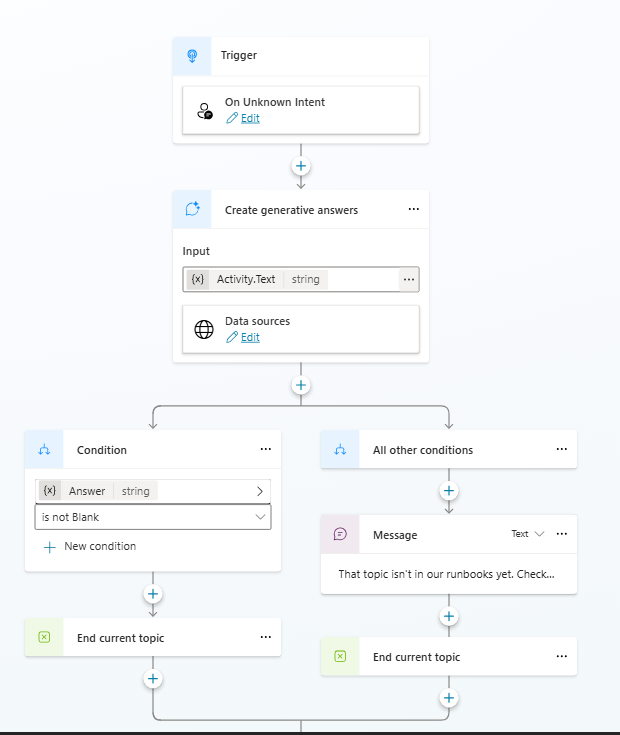
Figure 2. Refusal Message node on the All other conditions branch, ending the topic explicitly instead of falling through to the platform default.
One Entra group is the entire access model, from the admin's chair. Add a service desk technician to the Service Desk group and the Teams app appears in their sidebar and their SharePoint read access is granted, both from that one edit. Remove them and both revoke together. That is true operationally. Underneath, two independent surfaces enforce it: SharePoint library ACLs gate content, and the Microsoft 365 admin center app policy gates visibility and pre-install. Both point at the same group. Adding or removing a member of a stable group is a single invisible action. The thing to know is that swapping to a different group means updating both surfaces together, and for future multi-group scale the clean pattern is a wrapper security group with team groups nested inside it, so the app policy and the SharePoint ACL keep pointing at one object.
| Layer | Mechanism | Configured in |
|---|---|---|
| Content access | SharePoint library ACL grants Read to the Service Desk group | SharePoint site > ITRunbooks library > Permissions |
| Runtime grounding | Delegated auth: agent retrieves as the signed-in user | Copilot Studio agent settings (Authenticate with Microsoft) |
| App visibility and pre-install | M365 admin center scopes and pushes the app to group members | M365 admin center > Agents > Ask Runbook > Users |
| Governance overlay | Agent 365 default policy applies Purview audit and Defender monitoring | M365 admin center > Publish wizard > Apply template |
On first use, each service desk technician consents once to the two Work IQ Preview connectors, one for identity and one for the Microsoft 365 semantic index. Both use delegated permissions, so the agent only ever acts with that user's own SharePoint access. It is a one-time click per user, and worth calling out in the launch note so nobody files a ticket about it.
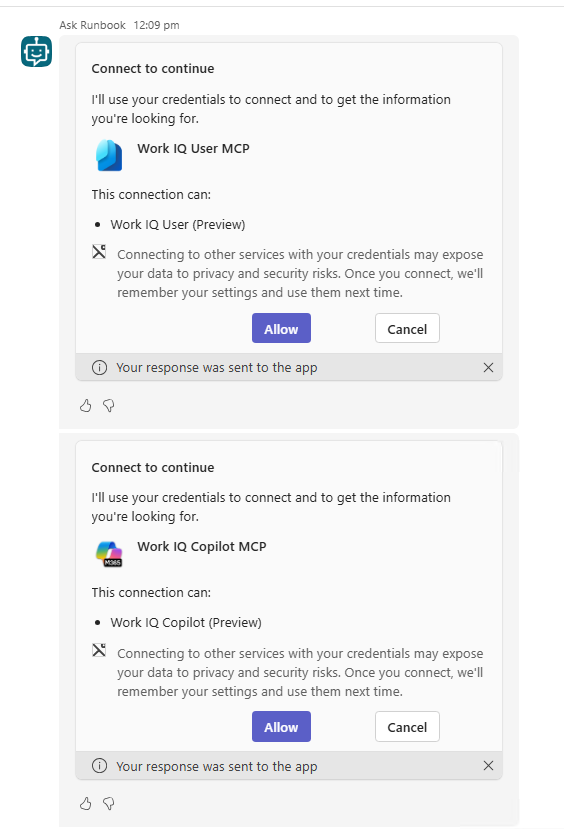
Figure 3. First-use consent: each engineer approves the two Work IQ Preview connectors once, both using delegated permissions.
The model picker is also a data-flow decision
The model dropdown in Copilot Studio looks like a quality choice. It is also a data-residency choice, and the difference is invisible in the UI.
For Claude models provided under Microsoft’s subprocessor arrangement, the Microsoft Product Terms and Data Protection Addendum apply. Models labelled “Anthropic models with Data Retention” have separate terms and require explicit admin approval. Choosing an Azure-hosted model changes the processing arrangement, but the applicable regional commitments still need to be checked.
The regional defaults are Microsoft's own acknowledgment of the gap. Microsoft enables Anthropic models by default for most commercial-cloud customers, excluding EU, EFTA, and UK tenants, and Copilot Studio is explicitly one of the surfaces where Anthropic processing is excluded from the EU Data Boundary. Update since publication: On July 22, 2026, Microsoft introduced an optional setting for non-federal GCC customers. Processing takes place outside Microsoft’s FedRAMP-authorized US Government cloud. Anthropic remains unavailable to federal GCC customers, GCC High, DoD, and other sovereign clouds.
For this build the Claude choice is fine, and the reasons are specific. The tenant is a Canadian lab tenant, not under EU or UK residency defaults. The runbook content is synthetic, with no real customer data, no PII, and nothing regulated in it. And the purpose is a portfolio and demonstration build where Claude Sonnet 4.6's grounded-Q&A quality is a good fit.
For a production deployment, this is a decision to make at the start, not after publishing. An organization with residency or regulatory obligations should verify the selected model’s processing locations, applicable contractual commitments, and tenant settings against its requirements before deployment. Subprocessor arrangements, regional defaults, and available models all change, so any residency claim in a production-deployment document should be checked fresh against the Anthropic-as-subprocessor page on learn.microsoft.com at delivery time.
The point worth carrying into a procurement or compliance conversation is that model choice and data flow are the same choice. “Copilot Studio gives us a choice of models, and that choice is also a data-flow choice, so for your compliance context we would use X because Y” turns a lurking risk into a governance decision the organization can make deliberately.
What retrieval quality actually depends on
Not volume. Structure. Every runbook uses a fixed six-part shape: Overview, Prerequisites, step-by-step Configuration, Known Issues, Last Updated, and an optional Source. A semantic query lands on the right section reliably when the structure is predictable across the library, and it degrades when it is not. This build uses Word .docx and modern SharePoint pages, which are what I tested retrieval and citation rendering against.
New runbooks inside the existing topic scope get picked up automatically after indexing, no workflow change and no prompt edit. The knowledge source description only needs touching if you add a genuinely new topic domain.
What I deliberately left out
The agent does not reset passwords, modify accounts, change group memberships, or create tickets. It retrieves and it cites. Ticket creation belongs in a separate pipeline, the n8n-based helpdesk automation that handles external ticket intake and classification for end users. These are two projects with two audiences: one automates the incoming ticket flow, this one makes the service desk technicians working those tickets faster. Keeping them separate keeps each one's responsibility legible. Combining knowledge retrieval with action would blur the line that makes a grounded agent trustworthy in the first place.
There is also no general-knowledge fallback, by design. The property that makes the agent worth trusting is that it refuses outside its scope. Adding a fallback to model knowledge would quietly delete that property.
Cost
The service desk technicians using Ask Runbook already hold Microsoft 365 Copilot licenses. For an internal, Teams-delivered agent serving licensed users, Microsoft covers the grounding and generative answers under those existing licenses, subject to fair-use limits, so there is no separate metered charge for this build.
The metered Copilot Credits model, where tenant graph grounding is billed per response, applies to external or customer-facing agents and to unlicensed users. That is worth knowing when sizing a public-facing deployment, but it is not this build. Here, the incremental cost is effectively zero: no metered grounding charge, no separate vector database bill, no external API bill, and no separate identity or monitoring cost. SharePoint and Teams are already licensed on any Microsoft 365 plan the service desk is likely running.
The honest limitations
Work IQ's connectors are Preview. For an internal lab deployment that is fine. For a production deployment, preview status belongs in the statement of work with the Microsoft roadmap tracked for GA, because preview behavior and licensing can change.
In my original tests, the built-in Evaluation feature returned connection prompts instead of answers, so those results did not measure retrieval quality. I validated the agent in the Test panel and Teams instead. Microsoft now documents authenticated evaluation profiles and connector connections in preview. That path needs retesting with this build before treating the earlier limitation as current.
The knowledge base is only as good as its coverage. A thin library means technicians hit “not in the runbooks yet” often enough to disengage. The fix is content cadence, not architecture: keep the six-part structure enforced and review the library on a quarterly minimum.
The pattern here is small on purpose, three runbooks and one group in one tenant, but every piece of it scales without redesign. The wrapper-group access pattern, the six-part content contract, the two-layer grounding enforcement, the engineered refusal, and the model-as-residency-decision are the same at three runbooks and at three hundred. The artifact worth showing is not the agent. It is the evidence that the agent retrieves from the intended sources and refuses the questions tested outside its scope, and that you can say exactly where every part of a request goes.
Questions about which path fits your environment are welcome. Please feel free to reach out.
