
Visitors often arrive at a site with a specific question in mind. They browse for a few minutes, and if they cannot find a quick answer, they leave. The contact form is there, the email address is there, but there is no way to get an immediate response, especially outside business hours.
I built an assistant that addresses that. It is configured around get2cloud.ca for the demo, so it knows my background, what the site covers, and how to handle the kinds of questions a visitor might ask. It can also help book a call or send a message to the site owner directly from the conversation, no separate form or scheduling page needed. But the build itself is the point, not the specific knowledge base. Swap the briefing, point it at a different site, and it works for any business.
The assistant is not running on get2cloud.ca itself, but it is fully live on a dedicated demo page. You can test the real thing at aichatbotdemo.get2cloud.ca/demo.html.
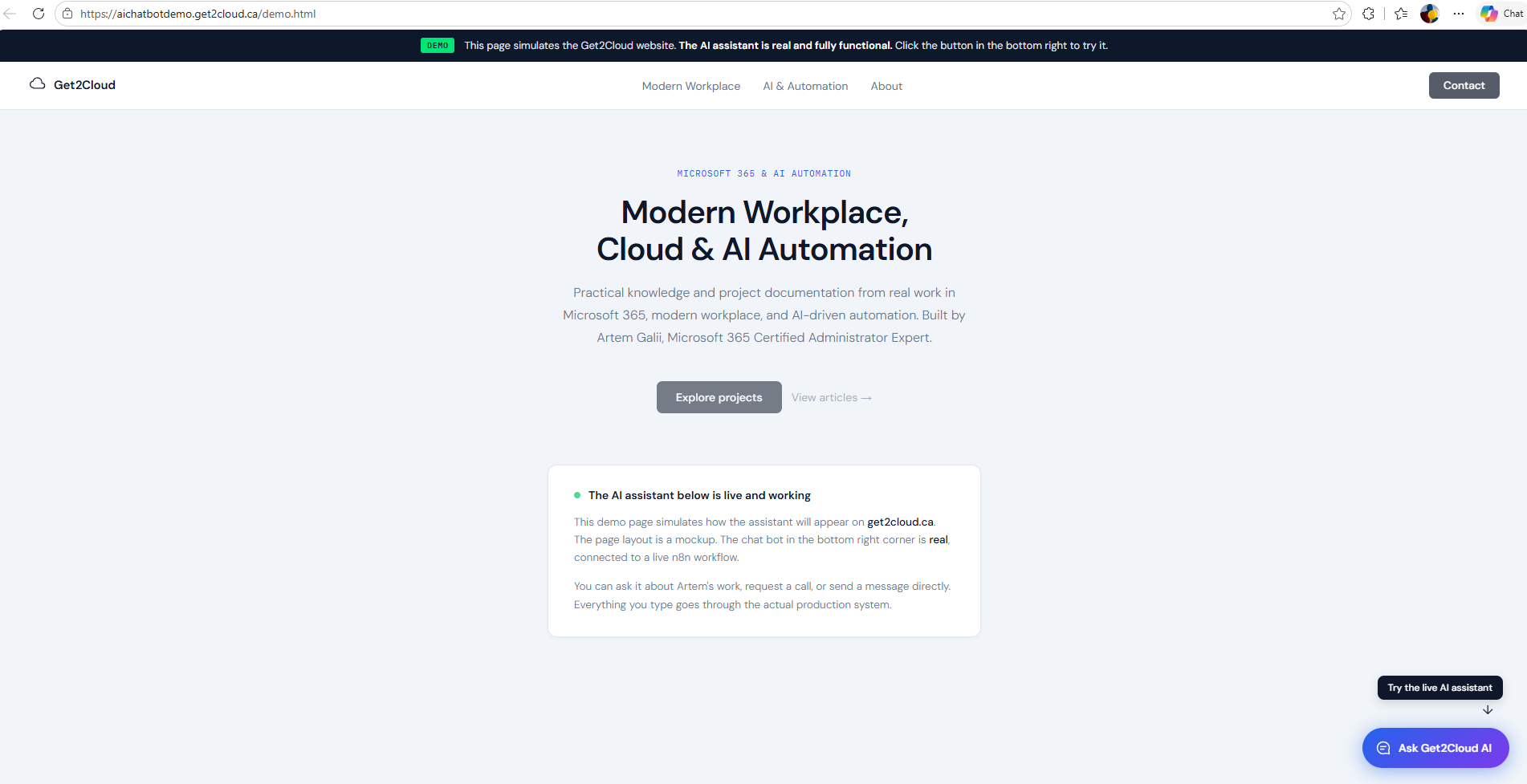
Figure 1. Get2Cloud demo page at aichatbotdemo.get2cloud.ca/demo.html
This article covers what it does, how it works under the hood, and how the same pattern could apply to other sites that want to add that kind of interaction.
Where the Gap Is
Most websites are built to inform, not to interact. That works fine for a lot of things, but it leaves a gap when a visitor actually has a question.
Someone checking out a solo practitioner or small business, whether that is a recruiter, a potential client, or a peer, often has one or two quick questions before deciding whether to take the next step. If those questions cannot be answered right away, the conversation just does not happen. It is not a failure of the site, it is just a limitation of static content.
This assistant fills that gap. It knows the site and the person behind it in detail. It can describe the work naturally, handle follow-up questions, and route a visitor toward a real next step when they are ready. When a visitor wants to book a call, it collects the details and sends a Microsoft Bookings link. When someone wants to pass along a message, it gathers the information, confirms it, and sends an email to the site owner.
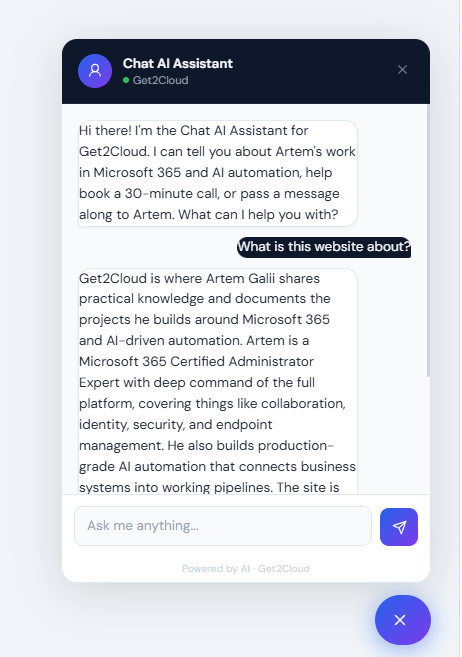
Figure 2. Chat AI Assistant widget showing a live visitor conversation
What It Is Actually Built On
The assistant runs on n8n as the orchestration layer, with Claude Haiku 4.5 as the AI model. The visitor-facing entry point is a JavaScript widget that embeds on any page. Everything behind it is an n8n workflow.
Email delivery handles two actions: contact messages and booking notifications. When a visitor sends a message, a formatted HTML email goes to the site owner. When a visitor books a call, two emails go out: a notification to the owner and a personalized booking link email to the visitor. Microsoft Bookings handles the calendar layer entirely. The visitor picks a time, gets a Teams meeting link automatically, and the owner gets notified when a slot is confirmed.
Telegram handles real-time visibility. Every time a visitor sends a message, a compact notification arrives in the owner's Telegram chat with the visitor's text and the bot's reply. When a visitor completes a booking or sends a contact message, a second Telegram message arrives with the full conversation transcript and the captured details. No dashboard to check, no logs to dig through.
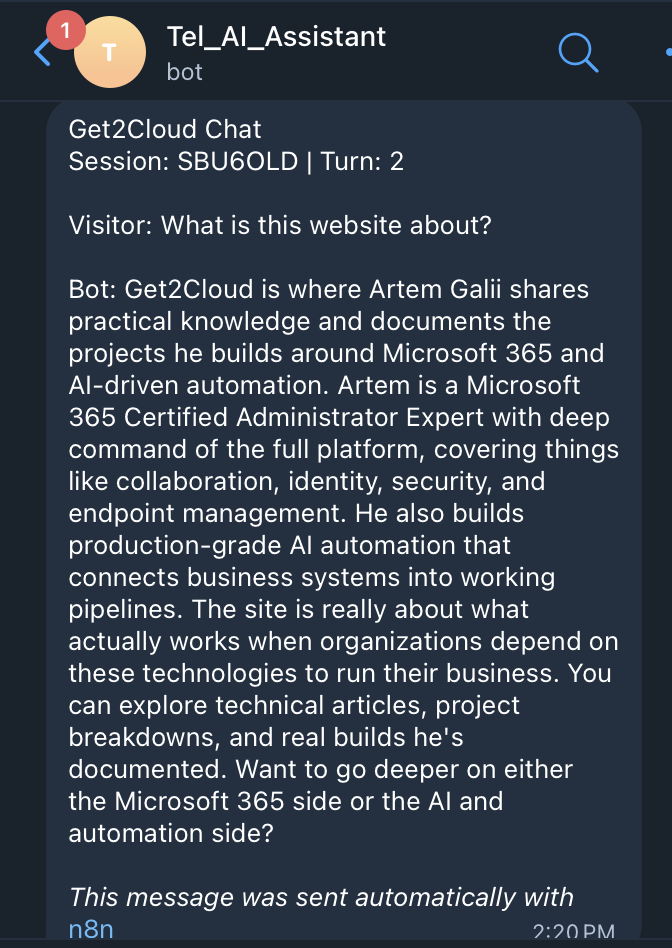
Figure 3. Telegram turn notification showing session ID, visitor message, and bot reply
Telegram is the notification layer in this build, but it is not the only option. WhatsApp works through the same HTTP Request node approach using the WhatsApp Business API. The setup is more involved than Telegram, which connects in minutes via BotFather, but the notification behavior on the owner's end is identical.
The widget is currently deployed on a standalone demo page hosted on Azure Static Web Apps at aichatbotdemo.get2cloud.ca/demo.html. For a production deployment, the widget code drops into a site's footer and runs on every page automatically.
How the Bot Remembers What You Said
Claude Haiku, like any AI model, has no memory of its own. Each request is independent. If you send it a message and then ask a follow-up question, it has no idea what the first message said unless you tell it again.
The n8n workflow handles this with dynamic prompting and conversation threading, rebuilding the full context on every request.
On every visitor message, the Build Claude Input node assembles a complete package before anything goes to Claude. That package has three parts. First, the static briefing: a detailed block of text that tells Claude who it is, what the site covers, how to handle specific question types, when to collect contact details, and exactly what format to return. This is written once and does not change between requests.
Second, the conversation history. Every previous message in the session, from both the visitor and the assistant, gets appended below the briefing with labels so Claude knows who said what. By the third message in a conversation, Claude has the full exchange in front of it.
Third, the new message. The thing the visitor just typed goes in as the current user input.
Claude reads all three parts together, as one document, and responds with full context of the session in front of it. That response then feeds back into the history on the next turn. The visitor experiences a bot that remembers what they said. Technically, the bot is just reading a very complete document on every request.
One practical detail: the workflow caps sessions at 20 messages and keeps the last 10 in context per request, with individual messages truncated to 400 characters. That keeps the context window manageable and prevents any one long message from consuming the available prompt budget.
The 20-message limit is set for the demo but is configurable in the Normalize Input node. It is not a security measure. It is cost and context control. Every visitor message triggers an API call to Claude Haiku, and without a ceiling, a single long session can grow the prompt to an unpredictable size. At Haiku pricing, a full 20-message conversation costs a few cents. Raising or lowering the cap is a one-line change.
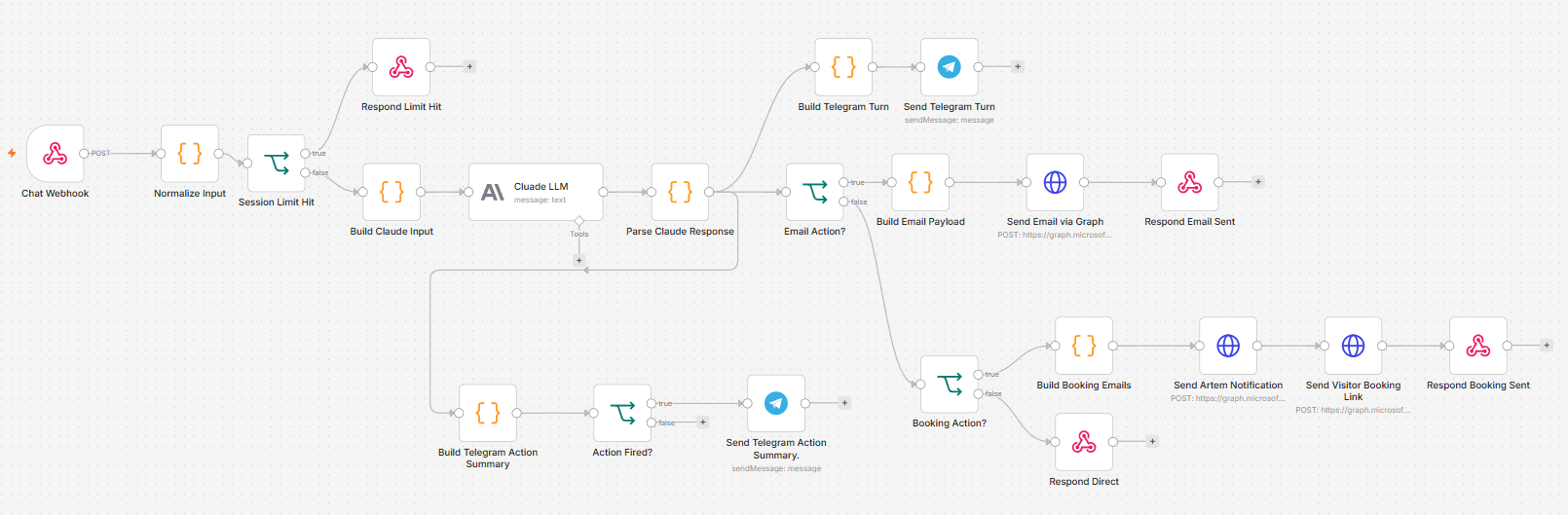
Figure 4. n8n workflow with Microsoft Graph API email routing
How the Bot Decides What to Do
The assistant does not just return text. Every response from Claude is structured JSON with two fields: a message for the visitor, and an action field that tells n8n what to do next.
The action field has three possible values. A null value means it was a general question and n8n returns the message directly to the widget. A send_email value means the visitor confirmed their contact details and n8n builds and sends the HTML email. A book_meeting value means the visitor confirmed their booking details and n8n fires two emails: the visitor gets a booking link, the owner gets a notification.
The Telegram notifications branch off in parallel after the response is parsed. They do not sit in sequence with the email routing, so they never delay the visitor getting their reply. The session ID in each Telegram notification is a stable 6-character hash of the first message in the session. Every notification from the same conversation groups under the same identifier, so you can follow a full visitor session across multiple Telegram messages without any server-side session storage.
Claude is not just generating text here. It is making a routing decision on every turn. The hardened parser in the Parse Claude Response node runs three recovery stages before falling back to a soft error message, so the visitor never sees a raw error if the model returns something unexpected.
The Email Layer Is Swappable
The demo workflow uses Microsoft Graph API for email delivery. Two emails go out per booking: the visitor gets a booking link from a professional domain address, the owner gets a notification. Contact messages route through the same Graph API connection. The App Registration that handles authentication is shared with another automation project on the same tenant, so there is no extra infrastructure to maintain.
But the Graph API connection is not what makes the assistant work. It is just the delivery mechanism. If the site owner is not on Microsoft 365, or simply does not want to set up an Azure App Registration, the same workflow runs on Gmail instead.
The Gmail version uses n8n's native Gmail node in place of the three HTTP Request nodes that call the Graph API endpoint. Same inputs, same subject lines, same body content, sent through a connected Gmail account. The only credential required is an OAuth2 Gmail connection in n8n, which takes about five minutes to configure.
Everything else stays identical: the AI model, the conversation threading, the Telegram notifications, the booking flow, the widget, and the routing logic. Swapping Graph API for Gmail is a three-node change and a credential swap. The visitor experience does not change at all.
For businesses already on Microsoft 365, the Graph API version is the cleaner option. Emails send from the professional domain, the App Registration is already in place, and everything stays within existing Microsoft infrastructure. For businesses on Google Workspace or anyone who wants a simpler setup with no Azure dependencies, Gmail works just as well. The assistant does not know or care which one is sending the email.
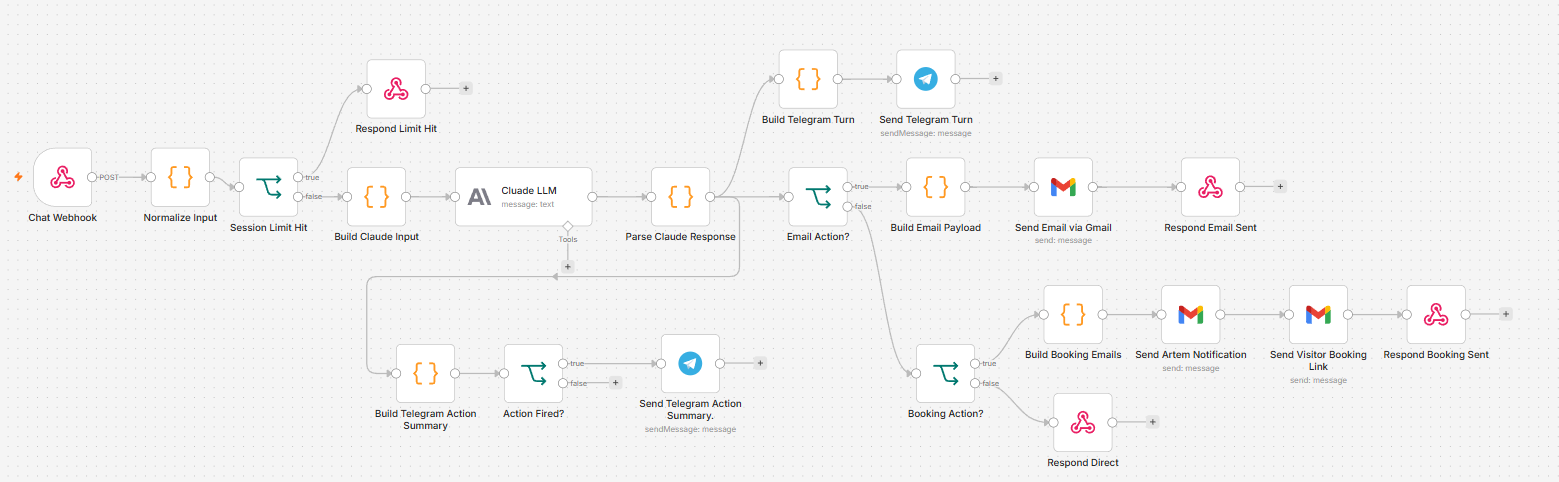
Figure 5. n8n workflow with Gmail email routing
Why This Architecture Works for Any Business
The specific knowledge base changes. The routing logic does not.
A law firm could use the same pattern. The static briefing tells Claude what the firm handles, how to describe the practice areas, what to collect from someone who wants a consultation, and where to send that request. The n8n workflow handles the rest.
A real estate agent could point the briefing at property listings, availability, and a booking calendar for walkthroughs. An MSP could build a tier-0 triage assistant that collects issue details, routes them to the right inbox, and keeps Telegram notifications live for the on-call engineer.
The stack is the same in every case: n8n for orchestration, Claude Haiku for AI reasoning, email delivery via Graph API or Gmail depending on the tenant, a booking calendar for scheduling, and a custom widget that hands conversation state back to the server on every message.
The choice of Claude Haiku was deliberate. The task complexity here is low: answer questions, collect details, route actions. Haiku responds in one to two seconds. For a chat widget on a business website, that response time matters. Using a heavier model would add latency and cost without changing the visitor experience.
A Note on Architecture Tradeoffs
This build is stateless on the server side. n8n holds nothing between requests. All conversation state lives in the visitor's browser and gets sent back to the server on every message. That means zero session management complexity, no database, no cleanup when a visitor leaves. For a low-traffic site with short to medium conversations it is the right call: simple, cheap, and easy to debug because you can read the entire conversation in one place and see exactly what Claude receives on every turn.
Where it differs from larger production deployments is persistence. If a visitor refreshes mid-conversation, the session starts over. For a lead capture and Q&A bot that is an acceptable limitation. For a customer support bot handling ongoing issues across multiple sessions or devices, you would want server-side session storage with a database to retain conversation history across page refreshes and returning visits.
At higher traffic volumes with longer conversations, a vector database can also help by retrieving only the most relevant parts of a conversation rather than sending the full history on every request. That adds complexity but keeps token costs predictable at scale.
For a portfolio or business site with moderate traffic and no need for cross-session memory, this architecture is the right fit. The added complexity of a database layer would bring no real benefit and a lot of extra maintenance.
Sites that need more, returning visitor memory, persistence across page refreshes, or longer session history, can be built with server-side session storage added to the same n8n stack. That is a separate build pattern and worth exploring if the use case calls for it.
Try It
The demo at aichatbotdemo.get2cloud.ca/demo.html runs the live assistant. The page layout simulates a real site, but the bot in the bottom right corner is fully connected to the live n8n workflow. Ask it something, try to book a call, or send a message.
If you have questions about the build or want to talk through how something similar could work for your site, feel free to reach out.
